
The Node.js Event Loop Explained (Complete Beginner to Intermediate Guide)
i am learner whatever i will learn i will write here
Introduction
If you’ve started learning backend development with Node.js, you’ve probably heard:
“Node.js is single-threaded but still handles thousands of requests efficiently.”
Sounds confusing, right?
The secret behind this is the Event Loop.
In this article, we’ll break it down in the simplest way possible — no heavy theory, just clear concepts + examples.
The Problem: Single Thread Limitation
Node.js runs on one main thread, which means:
It can execute only one piece of code at a time
Imagine this situation:
User 1 requests data
Server takes 5 seconds
Other users must wait
That would make Node.js slow and unusable
The Solution: Event Loop
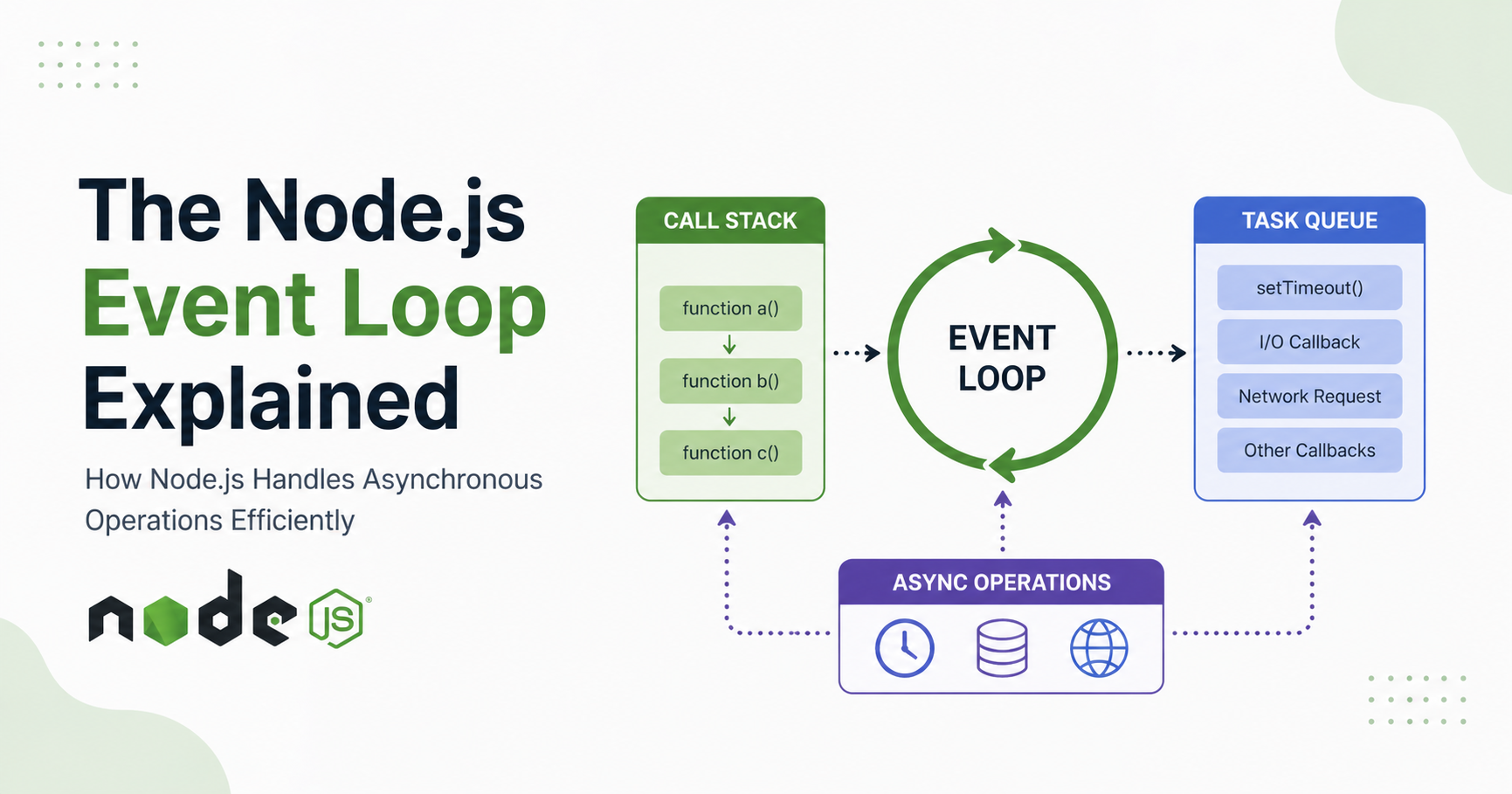
The Event Loop is like a smart manager that ensures:
Long tasks don’t block execution
Multiple users can be handled smoothly
Async tasks run efficiently
Key Components (Conceptual Understanding)
1. Call Stack
Where functions execute
Works like a stack (LIFO)
Example:
function one() {
  two();
}
function two() {
  console.log("Hello");
}
one();
Execution order:
one() → two() → console.log()
2. Task Queue (Callback Queue)
Stores async callbacks
Follows FIFO (First In First Out)
Examples:
setTimeoutAPI responses
File reads
3. Event Loop
Continuously checks:
Is Call Stack empty?
If yes:
Takes first task from queue → pushes to stack
Complete Execution Flow


Step-by-Step Flow:
Code enters Call Stack
Async operations go to background (Web APIs / system)
When done → callback goes to Task Queue
Event loop checks stack
If empty → pushes callback to stack
Executes it
Real Example (Important)
console.log("Start");

setTimeout(() => {
  console.log("Timer Done");
}, 0);

console.log("End");
Execution Breakdown:
"Start"→ printedsetTimeout→ moved to background"End"→ printedCallback added to queue
Event loop executes it
Final Output:
Start
End
Timer Done
Call Stack vs Task Queue
| Feature | Call Stack | Task Queue |
|---|---|---|
| Nature | Synchronous | Asynchronous |
| Structure | LIFO | FIFO |
| Execution | Immediate | Deferred |
| Example | function calls | setTimeout, API |
How Async Operations Actually Work
When you write:
setTimeout(() => {
  console.log("Done");
}, 2000);
What happens internally:
Timer registered in system
Node.js continues execution
After 2 seconds → callback added to queue
Event loop executes it
Non-Blocking Behavior (Core Advantage)
Blocking Example (Bad):
const data = readFileSync("file.txt");
console.log(data);
Non-blocking Example (Good):
readFile("file.txt", () => {
  console.log("File read");
});
✔ Server doesn’t stop
✔ Other requests continue
Timers vs I/O Callbacks (High-Level View)
Timers
setTimeout()setInterval()
Run after delay
I/O Callbacks
File system
Database queries
Network calls
Run when operation finishes
Why Event Loop Makes Node.js Scalable
Traditional servers:
One thread per request
Node.js:
One thread handles many requests
Benefits:
High performance
Handles thousands of users
Less memory usage
Faster applications
Event Loop Cycle (Continuous Process)


It keeps running forever:
Check Stack → Check Queue → Execute → Repeat
Easy Analogy (Best for Understanding)
Think of Node.js like a restaurant
Chef = Call Stack
Order List = Task Queue
Manager = Event Loop
Chef cooks one order
Manager assigns next order when free
Common Mistakes Beginners Make
“setTimeout(0) runs instantly”
No — it goes to queue
“Async runs parallel in main thread”
No — handled outside
“Node.js is multi-threaded”
Only internally for background work
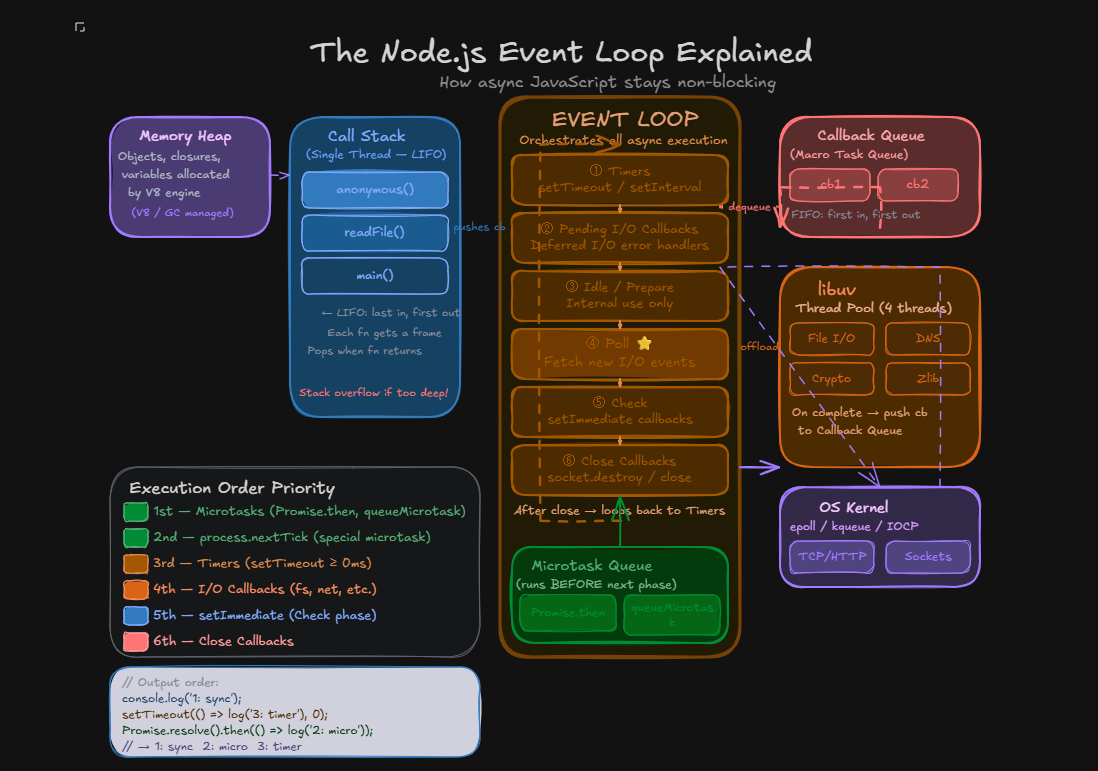
Diagram representation
Conclusion
By now, you clearly understand:
What the event loop is
Why Node.js needs it
How async execution works
Role of call stack & task queue
How Node.js achieves scalability